These 27 Claude Code Skills Turn It Into an AI Engineering Team
Claude Code is powerful on its own. With the right skills, it starts behaving like a specialized team of engineers, designers, researchers, and automation experts.
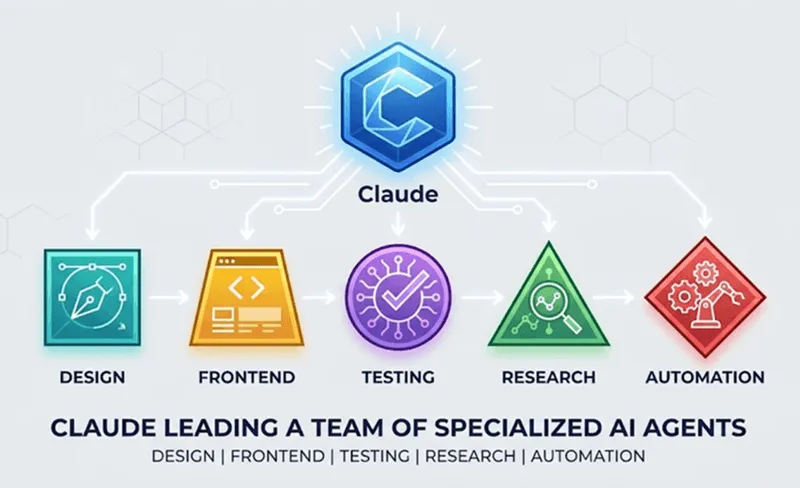
Claude Code Without Skills Is Only Half the Product
Modern AI coding assistants are incredibly capable.
They can generate code, explain architecture decisions, debug applications, review pull requests, and help developers navigate unfamiliar technologies.
Yet most developers use Claude Code exactly as it ships.
No specialized workflows.
No domain-specific knowledge.
No additional tooling.
No skills.
That is similar to buying a powerful workstation and never installing any software beyond the operating system.
The foundation is impressive, but most of the potential remains untapped.
Claude Code’s skills ecosystem changes that.
By installing specialized skills, Claude gains access to structured workflows, framework expertise, design knowledge, testing capabilities, documentation tools, and web automation features that dramatically improve the quality of its outputs.
The result is a very different experience.
Instead of behaving like a general-purpose assistant, Claude starts acting like a team of specialists working together.
A React architect.
A frontend designer.
A QA engineer.
A documentation expert.
A web automation specialist.
A code reviewer.
This guide covers 27 skills that can significantly improve everyday development workflows and explains how to install them properly.
What Are Claude Code Skills?
Skills are reusable capability packages that extend Claude’s behavior and expertise.
A skill can include:
- Framework best practices
- Development workflows
- Documentation references
- Design guidelines
- Code templates
- Tool integrations
- Review procedures
- Automation patterns
Instead of repeatedly explaining a workflow through prompts, developers can install a skill that permanently teaches Claude how to approach a particular task.
This creates more consistent results and reduces prompt complexity.
Think of skills as apps for Claude Code.
The base model remains the same, but its capabilities expand dramatically.
Why Skills Matter
Modern software development has become increasingly specialized.
A typical day might involve:
- Building React components
- Designing interfaces
- Writing documentation
- Reviewing pull requests
- Testing applications
- Crawling websites
- Researching APIs
No developer remembers every best practice for every domain.
Skills help fill those gaps.
Instead of relying entirely on general knowledge, Claude can leverage specialized expertise designed specifically for the task at hand.
This often results in:
- Better architecture
- Cleaner code
- Faster research
- Improved UI quality
- More reliable reviews
- Better testing workflows
The Complete 27-Skill Setup
The skills fall into five primary categories:
Design and Creative Skills
These skills improve Claude’s ability to generate visual concepts, design systems, and UI assets.
| Skill | Purpose |
|---|---|
| canvas-design | Posters, illustrations, design concepts |
| theme-factory | Presentation and document themes |
| web-artifacts-builder | Interactive web components |
| webapp-testing | Browser and UI testing |
These are particularly useful for developers who frequently build landing pages, dashboards, SaaS applications, and marketing websites.
Firecrawl Skills
Firecrawl skills transform Claude into a capable web research and automation assistant.
| Skill | Purpose |
|---|---|
| firecrawl | Main Firecrawl entry point |
| firecrawl-search | Website search |
| firecrawl-scrape | Single-page extraction |
| firecrawl-crawl | Full-site crawling |
| firecrawl-map | Site mapping |
| firecrawl-interact | Form filling and interaction |
| firecrawl-download | Website downloads |
| firecrawl-parse | Content parsing |
| firecrawl-agent | Autonomous browser actions |
| firecrawl-build-scrape | Scrape API integration |
| firecrawl-build-search | Search API integration |
| firecrawl-build-interact | Interact API integration |
| firecrawl-build-onboarding | Firecrawl project setup |
Together, these skills allow Claude to work with websites in ways that would traditionally require dedicated scraping tools.
Frontend Development Skills
Frontend developers will likely get the biggest productivity boost from this category.
| Skill | Purpose |
|---|---|
| frontend-design | Production-grade frontend development |
| shadcn | shadcn/ui integration |
| web-design-guidelines | UI review and design consistency |
These skills improve:
- Layout quality
- Component architecture
- Responsive design
- Accessibility
- Design consistency
React and Next.js Skills
React developers should consider these mandatory.
| Skill | Purpose |
|---|---|
| vercel-react-best-practices | React optimization and architecture |
| vercel-composition-patterns | Component composition patterns |
| vercel-react-native-skills | React Native best practices |
These skills teach Claude modern React patterns that are often missing from generic AI-generated code.
Instead of producing beginner-level implementations, Claude begins recommending patterns commonly used in production applications.
Productivity and Research Skills
These skills improve everyday developer workflows.
| Skill | Purpose |
|---|---|
| find-skills | Discover new skills |
| requesting-code-review | Structured code reviews |
| find-docs | Documentation discovery |
They may not generate code directly, but they often save the most time.
Install All 27 Skills in One Command
For developers who want the complete setup immediately, all 27 skills can be installed globally using a single command.
npx skills add anthropics/skills@canvas-design -g -y && \
npx skills add anthropics/skills@theme-factory -g -y && \
npx skills add anthropics/skills@web-artifacts-builder -g -y && \
npx skills add anthropics/skills@webapp-testing -g -y && \
npx skills add firecrawl/cli@firecrawl -g -y && \
npx skills add firecrawl/cli@firecrawl-scrape -g -y && \
npx skills add firecrawl/cli@firecrawl-search -g -y && \
npx skills add firecrawl/cli@firecrawl-agent -g -y && \
npx skills add firecrawl/cli@firecrawl-crawl -g -y && \
npx skills add firecrawl/cli@firecrawl-map -g -y && \
npx skills add firecrawl/cli@firecrawl-interact -g -y && \
npx skills add firecrawl/cli@firecrawl-download -g -y && \
npx skills add firecrawl/cli@firecrawl-parse -g -y && \
npx skills add firecrawl/skills@firecrawl-build-scrape -g -y && \
npx skills add firecrawl/skills@firecrawl-build-search -g -y && \
npx skills add firecrawl/skills@firecrawl-build-interact -g -y && \
npx skills add firecrawl/skills@firecrawl-build-onboarding -g -y && \
npx skills add anthropics/skills@frontend-design -g -y && \
npx skills add shadcn/ui@shadcn -g -y && \
npx skills add vercel-labs/agent-skills@web-design-guidelines -g -y && \
npx skills add vercel-labs/agent-skills@vercel-react-best-practices -g -y && \
npx skills add vercel-labs/agent-skills@vercel-composition-patterns -g -y && \
npx skills add vercel-labs/agent-skills@vercel-react-native-skills -g -y && \
npx skills add vercel-labs/skills@find-skills -g -y && \
npx skills add obra/superpowers@requesting-code-review -g -y && \
npx skills add upstash/context7@find-docs -g -y
The -g flag installs skills globally, making them available across all projects.
The -y flag skips confirmation prompts, which is useful for batch installations.
Recommended Starter Pack
Installing all 27 skills may be excessive for new users.
A smaller starter pack delivers most of the value immediately.
npx skills add vercel-labs/skills@find-skills -g -y

npx skills add anthropics/skills@frontend-design -g -y

npx skills add upstash/context7@find-docs -g -y

npx skills add obra/superpowers@requesting-code-review -g -y

npx skills add anthropics/skills@webapp-testing -g -y
This setup covers:
- Documentation
- Development
- Reviews
- Testing
- Skill discovery
Recommended Setup for React Developers
For React-focused teams, adding these skills provides immediate value.
npx skills add shadcn/ui@shadcn -g -y

npx skills add vercel-labs/agent-skills@vercel-react-best-practices -g -y

npx skills add vercel-labs/agent-skills@vercel-composition-patterns -g -y

npx skills add vercel-labs/agent-skills@web-design-guidelines -g -y
Together they improve:
- Component design
- Performance recommendations
- Architecture quality
- UI consistency
Verifying Installed Skills
After installation, verify that everything is available.
List installed skills:
npx skills list -gSearch for skills:
npx skills find reactUpdate installed skills:
npx skills update -gRemove a skill:
npx skills remove <skill-name> -gKeeping skills updated ensures Claude benefits from the latest workflows and improvements.
Creating Custom Skills
One of the most powerful features of Claude Code is the ability to create custom skills.
Every company eventually develops:
- Internal coding standards
- Review processes
- Architecture guidelines
- Deployment procedures
- Documentation requirements
Custom skills allow these workflows to become reusable.
A custom skill can contain:
- Instructions
- Best practices
- Review criteria
- Company-specific rules
- Reporting templates
Over time, teams can build an internal library of expertise tailored to their own workflows.
This is where Claude starts feeling less like a chatbot and more like a real engineering teammate.
Why Most Developers Underuse Claude Code
Many developers focus entirely on prompting.
They spend hours refining instructions while ignoring the ecosystem around the model.
Skills often produce bigger improvements than prompt engineering.
They provide:
- Better context
- Better workflows
- Better consistency
- Better outputs
without requiring developers to repeatedly explain the same processes.
The strongest Claude Code setups combine:
- Well-written prompts
- High-quality skills
- Project-specific context
- Custom workflows
Together they create an environment where Claude can operate at a much higher level.
Final Thoughts
Claude Code is already one of the most capable AI development tools available.
But the base installation only reveals part of its potential.
The right skills can transform it into something much more powerful.
A frontend engineer.
A React architect.
A QA specialist.
A documentation assistant.
A design consultant.
A web automation expert.
Installing all 27 skills is not necessary for everyone, but understanding what the ecosystem offers is worth the effort.
For developers building modern applications in 2026, skills are quickly becoming one of the easiest ways to unlock more value from AI-assisted development.